

Summertime Saga Pink Channel Guide (2026): Password, PIN, Account & TV Code
The Pink Channel is one of the most searched puzzles in Summertime Saga because it has multiple moving parts — a laptop password, an account, a PIN, and a TV login — and none of them work until Jenny’s route has reached a specific point. This guide gives you the direct answers and explains exactly what to do in what order.
Quick Answers
| What You Are Looking For | Answer |
|---|---|
| Jenny’s laptop password | Rump |
| Where the password comes from | Jenny’s diary and the sticky note in her room |
| Pink Channel account details | Revealed during the laptop browsing scene |
| Pink Channel PIN or TV code | Shown on the laptop — use it on the living room TV |
| Why the laptop is not interactive | Jenny’s diary has not been read yet |
| Why the TV is not working | The laptop scene was not completed or was exited early |
What Is the Pink Channel?
The Pink Channel is an adult content platform Jenny is secretly subscribed to. It becomes part of her route mid-game when the MC discovers the subscription through her laptop. The sequence involves finding the laptop password, accessing the account on the laptop, and then using the login credentials on the living room TV.
It is not a standalone puzzle. Every part of it is gated behind Jenny’s route progress. Players who try to access the TV directly without going through the laptop sequence first find nothing there.
Jenny’s Laptop Password
The password is Rump.
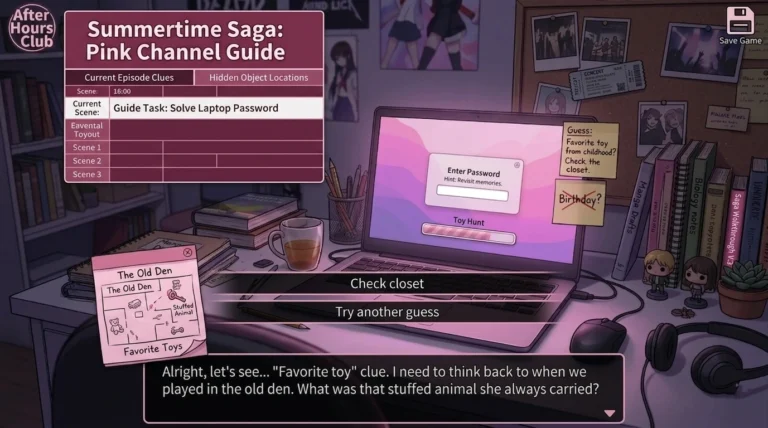
Rump is the name of Jenny’s favorite childhood stuffed animal. The game hints at this through two sources in her room — a sticky note on the computer desk and entries in her diary. Players who explore the room before attempting the laptop find both clues. Players who skip the room exploration and go straight to the laptop find an input field they cannot yet use.
The sticky note reference feels cryptic on its own. The diary makes it clear. Reading the diary first is the intended order.
If the password field is not appearing when you interact with the laptop, Jenny’s diary has not been read yet. The laptop is not interactive until that trigger is set.
How to Unlock the Laptop Step by Step
Step 1: Progress Jenny’s route through the early household interactions. This includes helping with tasks, fulfilling her money requests, and visiting at different times of day. The route needs to reach a specific mid-point before her room becomes accessible without her present.
Step 2: Visit Jenny’s room during a time window when she is not there. This happens in the mid-stage of her route. Morning visits sometimes work but the window varies. Try morning and afternoon if she is consistently present.
Step 3: Interact with the diary on her desk. Read all available diary entries. This sets the flag that makes the laptop interactive and gives you the context for the password.
Step 4: Interact with the sticky note near the computer. This is the second hint the game provides. Together with the diary it makes the password obvious.
Step 5: Interact with the laptop and enter the password — Rump. The laptop unlocks and the browsing sequence begins.
Step 6: Browse through the laptop content. The Pink Channel account details and login credentials appear during this sequence. Note them or remember them for the TV step.
How to Access the Pink Channel on the TV
After the laptop sequence is complete, the TV in the living room becomes the next step.
Step 1: Go to the living room and interact with the TV.
Step 2: The game will prompt for the Pink Channel account details that appeared on Jenny’s laptop.
Step 3: Enter or confirm the login using the credentials from the laptop scene.
Step 4: The Pink Channel opens and the next part of Jenny’s route continues from here.
The TV does not ask for a fixed code that you memorize outside the game. The credentials come from the laptop scene itself. If the TV is not responding or shows nothing Pink Channel related, the laptop scene was either not fully completed or was exited early through the Android back button rather than through the in-game exit.
Full Pink Channel Progression — What Gates What
This is the most useful thing to understand about this puzzle. Every step depends on the previous one. Skipping or partly completing any step blocks everything that follows.
| Step | What Happens | What You Need |
|---|---|---|
| 1 | Early Jenny route interactions | Nothing — available from start |
| 2 | Jenny’s room accessible when she is out | Mid-route progress, correct time of day |
| 3 | Diary becomes interactable | Must be at mid-route stage |
| 4 | Sticky note readable | No extra requirement |
| 5 | Laptop becomes interactive | Diary must have been read |
| 6 | Laptop password accepted | Enter Rump correctly |
| 7 | Pink Channel credentials shown | Laptop browsing scene must complete fully |
| 8 | TV Pink Channel accessible | Laptop scene must be fully completed |
| 9 | Debbie route events unlock | Pink Channel TV scene must have played |
Step 9 is worth noting. Some Debbie route events will not trigger until the Pink Channel TV scene has completed. If Debbie’s route has stalled in the mid-stage without explanation, finishing the Jenny Pink Channel sequence is often the reason progress opens back up.
How Debbie’s Route Connects Here
Jenny and Debbie share household events in the mid to late stages. The Pink Channel sequence sets flags that some Debbie events depend on. This is the most commonly missed cross-route dependency in the game.
If Debbie has been consistently visited at the right times but nothing new is appearing, check whether Jenny’s laptop and TV sequence is fully complete. Once it is, return to Debbie in the morning and evening and the stalled events usually trigger.
Debbie’s time-of-day schedule also matters here. Her mid-stage events are mostly evening and night. Players visiting only in the morning during this phase consistently miss available content regardless of whether the Jenny sequence is done.
Why Progress Stops — Every Common Reason
Laptop is not interactive The diary has not been read. This is a hard requirement. Interacting with the laptop before reading the diary does nothing. Go back to Jenny’s room at the right time, find the diary on her desk, and read all entries. The laptop becomes interactive after that.
Jenny’s room is never empty The time window when Jenny leaves her room depends on how far the route has progressed. If she is always present, the route has not reached the mid-point yet. Keep helping with household tasks and fulfilling requests before trying again.
Password is being rejected Two possible causes. The keyboard on your device is auto-correcting or capitalizing the input. Disable auto-correct and retype manually. The password is Rump with a capital R. On some older or heavily modded builds the exact word may vary slightly but the clue system works the same way — the answer comes from the diary.
TV is not showing Pink Channel content The laptop scene was exited early. If the Android back button was pressed mid-scene rather than using the in-game exit, the completion flag was not set. Return to the laptop, replay the full scene, and exit through the in-game interface.
Laptop scene replayed but TV still not working Check whether the laptop is showing the same browsing content or whether it has moved to a completed state. If the laptop scene appears finished but the TV is still not responding, force-stop the game, reopen it, and interact with the TV again. Occasionally the flag sets but the TV needs a fresh session to detect it.
Route seems stuck even after everything above An old save from an earlier version carried forward may have a broken event flag. Loading a slightly earlier save and replaying the laptop sequence is the most reliable fix for this.
MOD Version Notes
In the MOD APK the Pink Channel sequence is fully accessible from the start. Stats and money requirements for Jenny’s route are removed.
The story still follows the same structure. The diary still needs to be read before the laptop becomes interactive. The laptop scene still needs to complete fully before the TV activates. The MOD removes barriers but does not skip the scene sequence itself.
If the laptop is not triggering in the MOD version, open the Debug Menu through game settings. Check the story flags for Jenny’s laptop event. It shows exactly which condition the game is waiting for. In most cases the flag shows the diary as unread even in the MOD version if that step was skipped.
Other Passwords and Codes in Summertime Saga
The Pink Channel is not the only locked content in the game. Several other puzzles use a similar hint and password structure.
| Puzzle | Location | How to Find the Answer |
|---|---|---|
| Jenny’s laptop | Jenny’s room | Diary and sticky note in same room |
| Chest code | Specific outdoor location | Clue placed near the chest |
| Safe combination | Interior location | Context from earlier scene in same route |
| Computer access | MC’s bedroom | Route progression dependent |
All of them follow the same logic. The answer comes from the environment around the lock, not from an external source. Looking around the same area or reading available written content in the game always provides the answer.
Frequently Asked Questions
What is Jenny’s laptop password in Summertime Saga?
The password is Rump. It is the name of Jenny’s favorite childhood stuffed animal. The game hints at this through the sticky note on her computer desk and entries in her diary.
Where do I find the Pink Channel account details?
The Pink Channel account credentials appear during the laptop browsing scene after you enter the password. They are not a fixed code you look up externally. Complete the full laptop scene and the credentials will appear on screen.
Why is Jenny’s laptop not interactive?
The diary has not been read. Reading Jenny’s diary is a hard requirement before the laptop becomes interactive. Enter her room when she is not present, find the diary on her desk, and read all entries.
Why is the TV not showing the Pink Channel?
Either the laptop scene was exited early using the Android back button rather than the in-game interface, or the laptop sequence has not been completed yet. Return to the laptop, replay the full scene, and exit normally through the game interface.
Why has Debbie’s route stalled after this point?
Some Debbie events depend on the Pink Channel TV scene being completed. Finish the full sequence including the TV step and then return to Debbie in the evening. Her stalled events usually trigger after this.
Does the MOD version skip the Pink Channel sequence?
No. The MOD removes stat and money gates but the scene sequence still needs to play out in order. Diary must be read, laptop must be completed, TV must be accessed. Use the Debug Menu if any step is not triggering correctly.
What if the password Rump is being rejected?
Disable keyboard auto-correct on your device and retype the password manually. Some Android keyboards capitalize automatically or add a space. The password is case-sensitive in some builds.
Are there other passwords like this in the game?
Yes. The chest code and a few other locked items use the same hint-and-answer structure. The answer is always found in the same area as the lock through notes, diary entries, or visual clues in the surrounding environment.
Conclusion
The Pink Channel sequence has four parts — reading the diary, entering the laptop password, completing the laptop browsing scene, and accessing the TV. Every part depends on the previous one. The most common stuck situation is the laptop not being interactive because the diary was skipped, and the second most common is the TV not responding because the laptop scene was exited early.
Read the diary first. Enter Rump as the password. Complete the full laptop scene through the in-game exit rather than the back button. Then access the TV. That order works every time.